 Sky & space atlas

See the sky of any place and moment, plan eclipses and satellite passes, print star maps.
Skyfold computes the real sky for any place and time in your browser: 8 920 stars, constellations, the Moon and planets, their rise and set times, twilight, eclipses from 2020 to 2040 and passes of the ISS or any satellite from orbital elements. It turns that sky into print-ready star-map posters, plans shadows from the Sun and counts how far you have travelled through space. All positions come from published astronomy algorithms checked against JPL, USNO and NASA reference values.
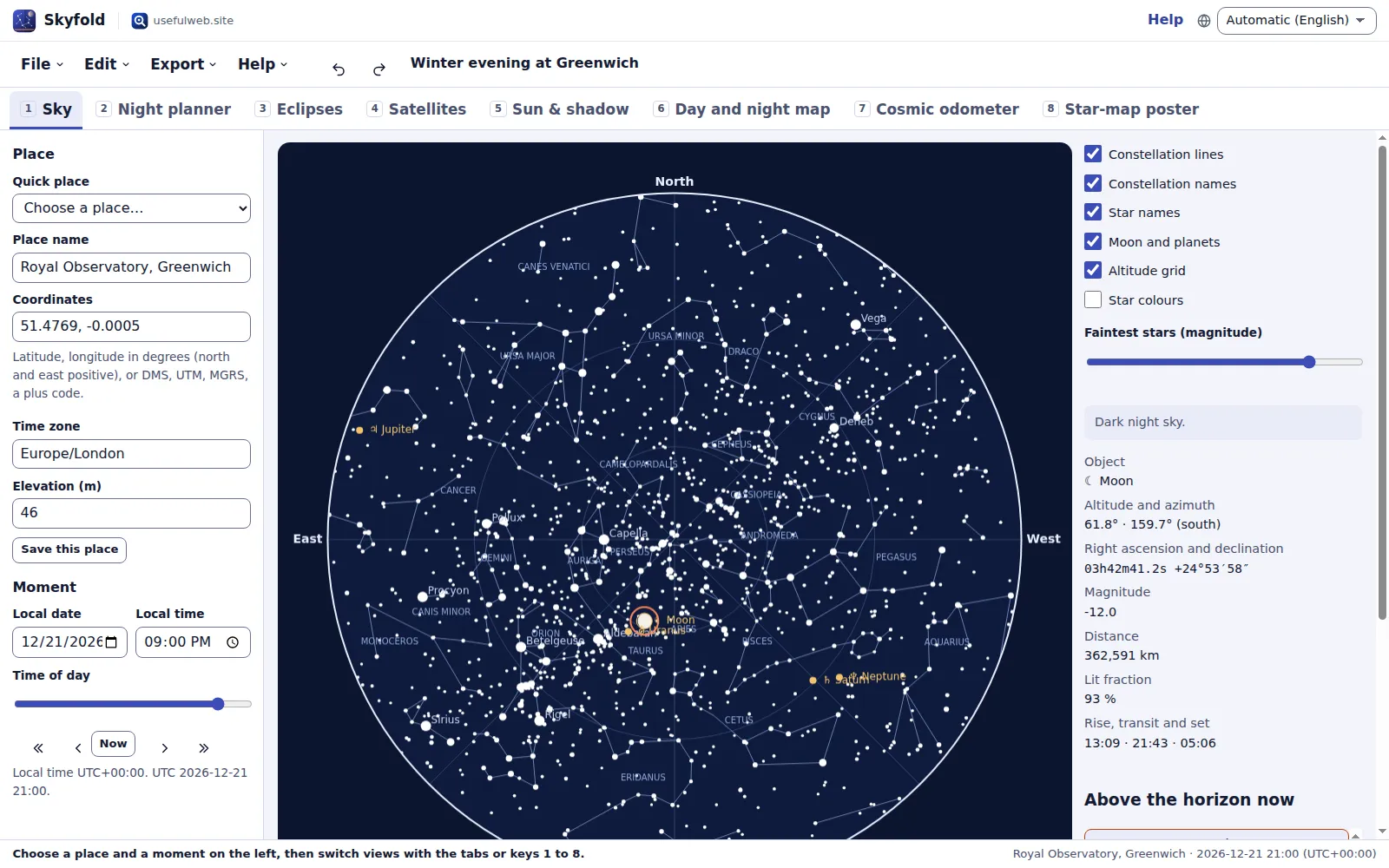
Screenshots
- The sky above your place, now or at any moment
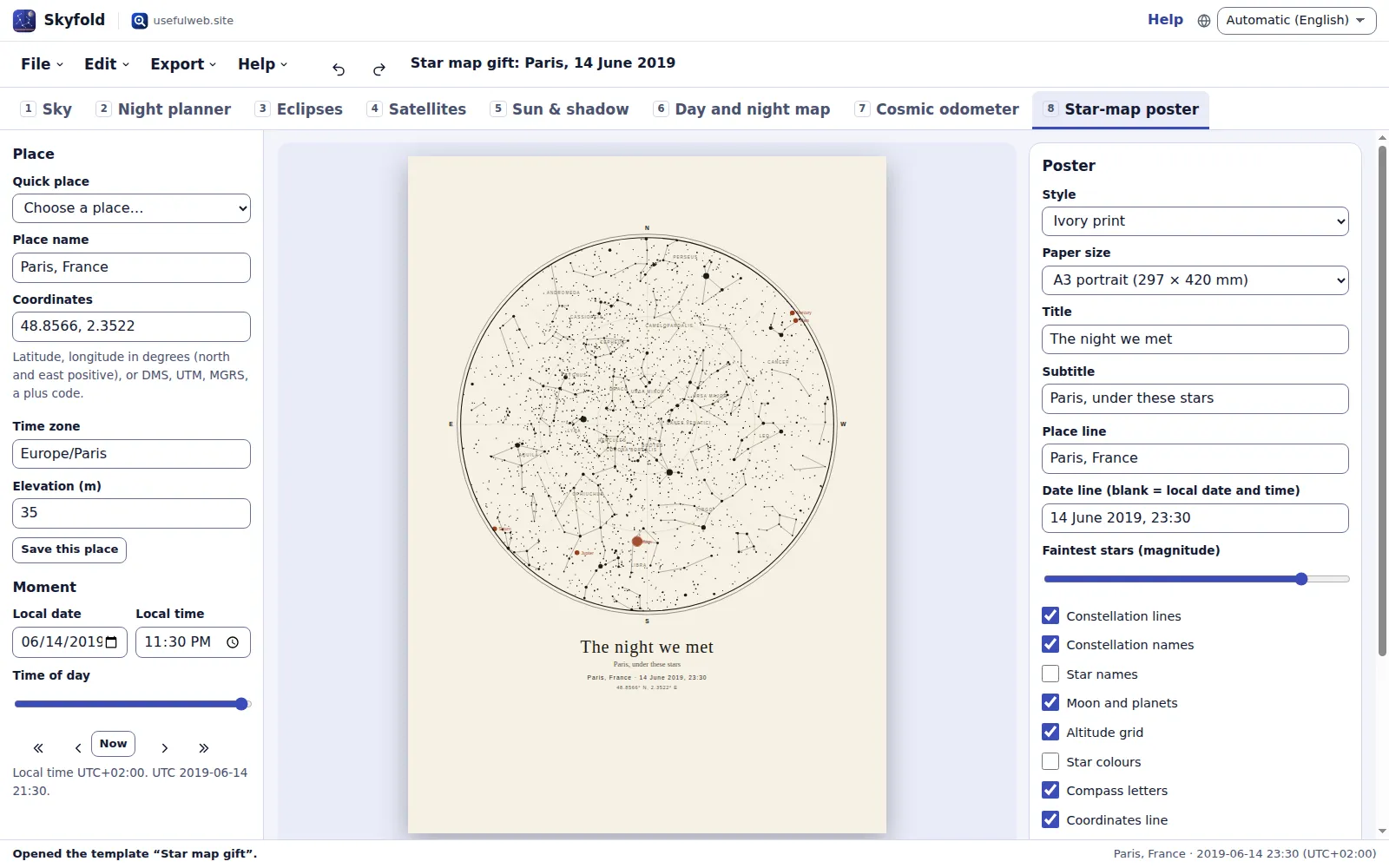 Print-ready star-map posters
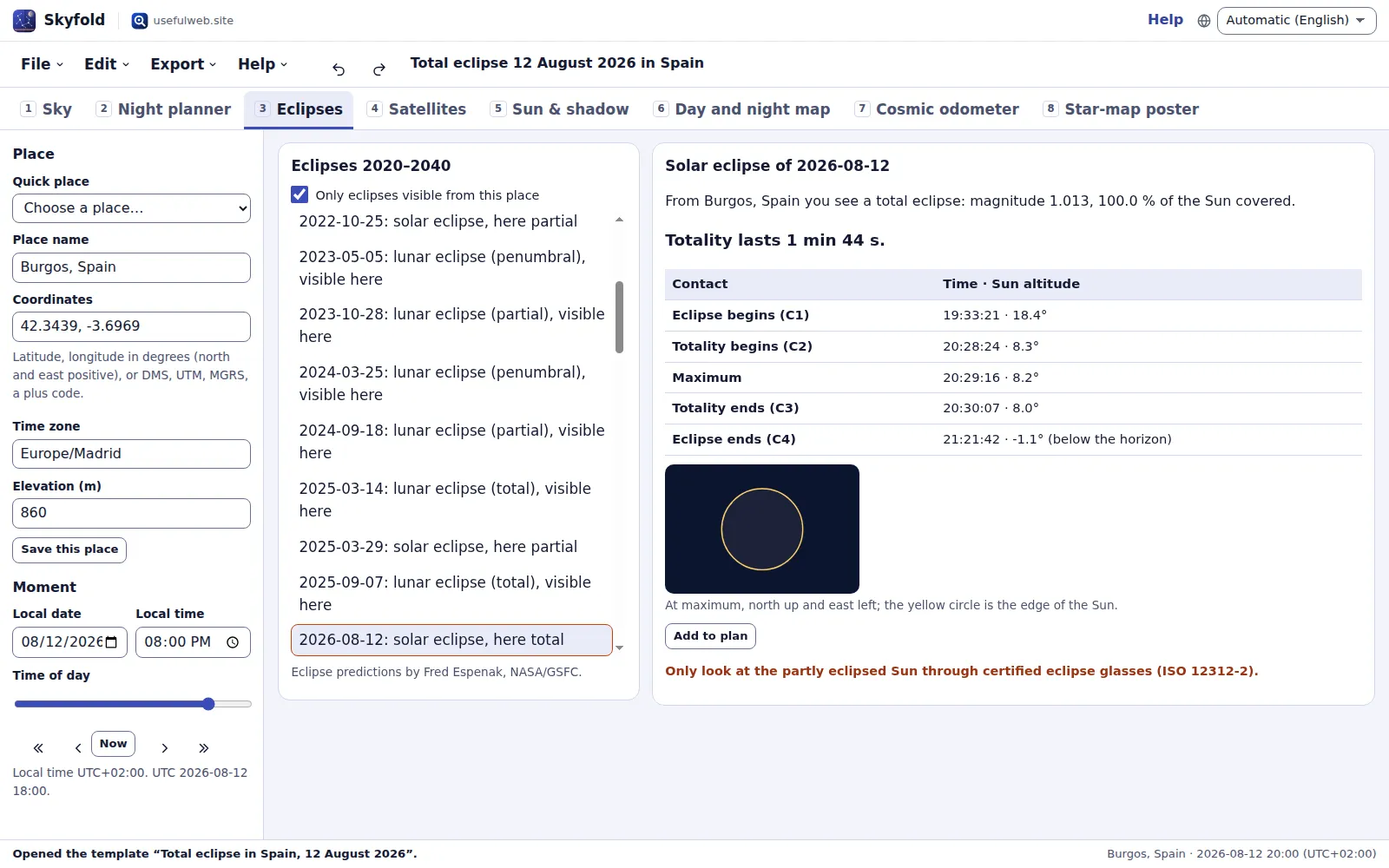 Eclipses with local contact times
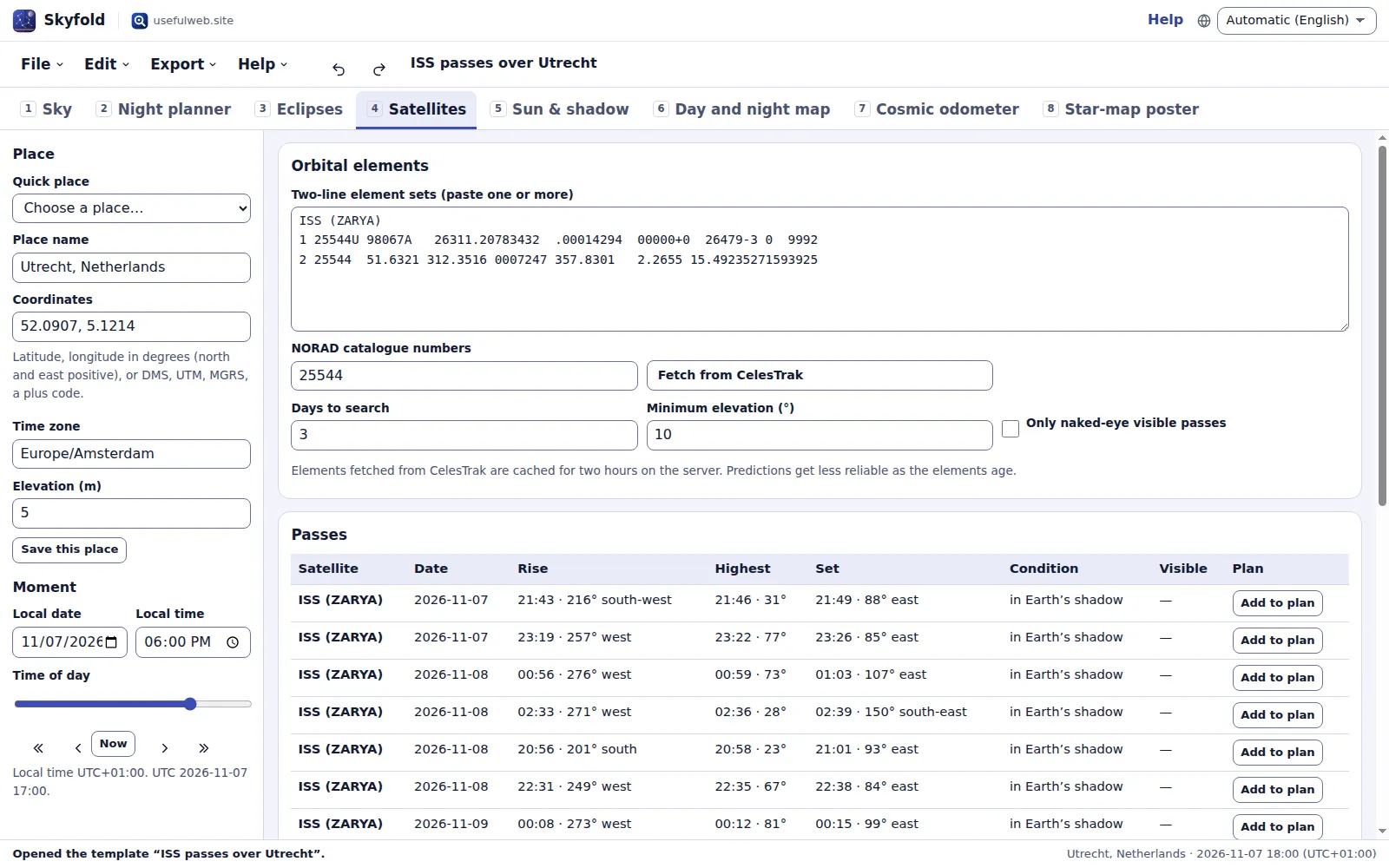 Satellite passes from orbital elements
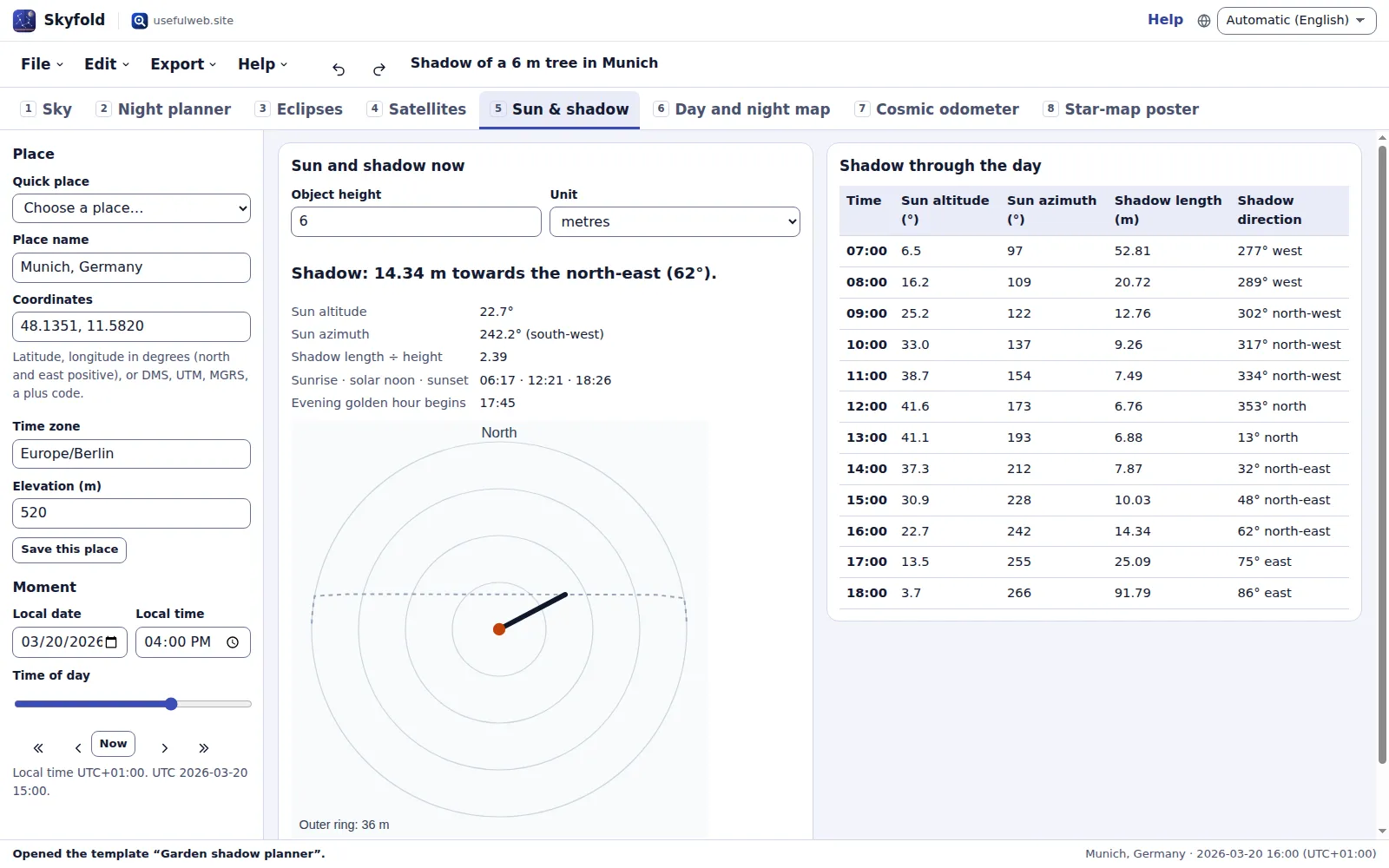 Sun, shadow and the day-and-night map
Features
Live sky view
Stars to magnitude 6.5, constellation figures, the Moon with its phase and the planets as they stand above your place, with time steps, a now button and object details on click.
Star-map posters
Five print styles, seven paper sizes from A4 to 18 × 24 in, your title and date lines; export vector PDF, SVG or PNG.
Night planner
Sunrise, sunset, civil, nautical and astronomical twilight, golden and blue hour, Moon and planet rise, transit and set, and when each planet is best seen.
Eclipses 2020–2040
Every solar and lunar eclipse with your local contact times, magnitude, obscuration, duration of totality and the Sun or Moon altitude, from NASA Besselian elements.
Satellite passes
Paste TLE elements or fetch them from CelesTrak; an SGP4 propagator finds rise, peak and set, and marks the passes you can see with the naked eye.
Sun and shadow
Sun azimuth and altitude, the length and direction of a shadow for any height through the day, plus a plan view and golden-hour times.
Day and night map
Where it is day, twilight and night on Earth right now, with the point where the Sun is overhead and your place marked.
Cosmic odometer
Distance you travelled since a date with the Earth’s spin, around the Sun, the Galaxy and the cosmic background, plus stars whose light left them when you started.
Camera framing
A finder chart around any bright star, planet or the Moon with your camera’s field of view, to hand over to Lumina’s Astro Lab.
Observation plan and calendar
Collect eclipses, passes, Moon phases and your own sessions in a plan and export them as an .ics calendar with reminders.
Checked accuracy
Planets within a few arcseconds of JPL Horizons, rise and set times equal to the USNO to the minute, SGP4 within a metre of the published test cases.
Private and local
Projects autosave in this browser with recent files, undo and redo, project files and share links that leave out birth dates and notes.


Templates
Start from a ready-made project and change it to fit.
Winter evening at Greenwich
The sky over the Royal Observatory at 21:00 on the December solstice, with Orion rising and the planets marked.
Total eclipse in Spain, 12 August 2026
Contact times, magnitude and Sun altitude for Burgos, with Reykjavík and Valencia saved for comparison.
ISS passes over Utrecht
Three days of International Space Station passes from real elements of 7 November 2026, with the visible ones marked.
Star map gift
An ivory A3 poster of the sky over Paris on 14 June 2019 at 23:30, ready to print as PDF or SVG.
Garden shadow planner
Where a 6 m tree in Munich throws its shadow through the day of the March equinox.
Cosmic odometer
How far the Earth has carried you around the Sun, the Galaxy and the cosmic background since 1 January 2000.
Built-in tools
Skyfold uses these tools. Each one also has its own page and works on its own, in the browser, through the JSON API and through MCP.
- Skyfold Star Map Poster Skyfold enginePrint the real night sky of any place and moment as an SVG or PDF poster.
- Skyfold Planet and Moon Positions Skyfold engineWhere the Sun, Moon and planets are, and when they rise and set, for any place and time.
- Skyfold Local Eclipse Circumstances Skyfold engineSolar and lunar eclipses 2020–2040 as seen from your place, with contact times.
- Skyfold Satellite Pass Predictor Skyfold engineWhen the ISS or any satellite flies over you, and whether you can see it, from TLE elements.
- Skyfold Sun Position and Shadow Length Skyfold engineSun angle and the length and direction of a shadow for any height, place and time.
- Skyfold Cosmic Odometer Skyfold engineHow far you have travelled through space since a date, frame by frame.
For AI agents
Skyfold runs on a deterministic engine. The same functions are available as tools with a JSON API and MCP, so scripts and AI agents get exactly the results the app shows.
- Skyfold Star Map Poster – Print the real night sky of any place and moment as an SVG or PDF poster.
Tool page ·POST https://skyfold.usefulweb.app/api/v1/tools/skyfold-star-map-poster/calculate· MCPskyfold_star_map_poster - Skyfold Planet and Moon Positions – Where the Sun, Moon and planets are, and when they rise and set, for any place and time.
Tool page ·POST https://skyfold.usefulweb.app/api/v1/tools/skyfold-planet-positions/calculate· MCPskyfold_planet_positions - Skyfold Local Eclipse Circumstances – Solar and lunar eclipses 2020–2040 as seen from your place, with contact times.
Tool page ·POST https://skyfold.usefulweb.app/api/v1/tools/skyfold-eclipse-local/calculate· MCPskyfold_eclipse_local - Skyfold Satellite Pass Predictor – When the ISS or any satellite flies over you, and whether you can see it, from TLE elements.
Tool page ·POST https://skyfold.usefulweb.app/api/v1/tools/skyfold-satellite-passes/calculate· MCPskyfold_satellite_passes - Skyfold Sun Position and Shadow Length – Sun angle and the length and direction of a shadow for any height, place and time.
Tool page ·POST https://skyfold.usefulweb.app/api/v1/tools/skyfold-sun-shadow/calculate· MCPskyfold_sun_shadow - Skyfold Cosmic Odometer – How far you have travelled through space since a date, frame by frame.
Tool page ·POST https://skyfold.usefulweb.app/api/v1/tools/skyfold-cosmic-odometer/calculate· MCPskyfold_cosmic_odometer
- MCP endpoint (Streamable HTTP):
https://skyfold.usefulweb.app/mcp - Project file format (JSON Schema): https://skyfold.usefulweb.app/project.schema.json
- OpenAPI description: /openapi.json · llms.txt · API & MCP
Build a project through the API, then open it in the app with a link to https://skyfold.usefulweb.app/app#project=<base64url JSON>.
Import & export
Import
- Skyfold project (.skyfold.json)
- Share link (#project=)
- Two-line element sets (TLE text, pasted or .txt/.tle file)
- Coordinates as decimal degrees, DMS, UTM, MGRS, Maidenhead or plus code
Export
- Skyfold project (.skyfold.json)
- Star-map poster: PDF, SVG and PNG
- Sky chart and framing chart: PNG and SVG
- Calendar (.ics) with reminders
- Planner, eclipse and pass tables as CSV
- Day-and-night map: SVG
- Share link
Keyboard shortcuts
| Keys | Action |
|---|---|
| 1 … 8 | Switch between Sky, Planner, Eclipses, Satellites, Sun & shadow, Globe, Odometer and Poster |
| N | Set the time to now |
| [ / ] | Step the time back or forward (one hour; with Shift one day) |
| C | Show or hide constellation lines in the sky view |
| Ctrl + Z | Undo |
| Ctrl + Shift + Z | Redo |
| Ctrl + S | Save project file |
| Ctrl + O | Open project file |
| ? | Show keyboard shortcuts (single-key shortcuts can be switched off there) |
Frequently asked questions
How accurate are the positions?
The Sun and planets come from a truncated VSOP87 theory and agree with JPL Horizons to a few arcseconds; the Moon (truncated ELP-2000/82) to about 10 arcseconds. Rise and set times matched the U.S. Naval Observatory to the minute in every test case. That is far below what the eye or a star map can show.
Which years can I use?
The sky, planner, poster, shadow and odometer work from 1800 to 2150. Eclipses cover 2020 to 2040, the span of the bundled NASA data. Satellite predictions are only good within a week or two of the element set’s date.
Why is the map mirrored compared with a road map?
A sky chart is drawn as seen when you lie on your back and look up with your head to the north: east is then on the left and west on the right. Hold the chart above your head facing south and it matches the sky.
Where do the satellite elements come from?
Paste two-line element sets from any source, or let Skyfold fetch them from CelesTrak through the usefulweb.site server. Each CelesTrak query is cached for two hours because the data change only about that often and CelesTrak asks users not to download more frequently.
Can I see a satellite on every listed pass?
No. A satellite is only visible when it is lit by the Sun while your sky is dark. Skyfold marks each pass as visible, in daylight, or in the Earth’s shadow, and shows the visible part separately.
Is the eclipse time exact for my street?
Contact times agree with NASA’s city tables to within about a minute. Elevation, mountains on the Moon’s edge and the exact shape of the Earth can shift them by a few seconds, and near the edge of the path a few hundred metres decide between total and partial.
What does the cosmic odometer add up?
It lists four motions separately: the Earth’s rotation at your latitude, its path around the Sun, the Sun around the Milky Way and the Solar System relative to the cosmic background radiation. They are measured against different reference points, so they are not summed into one number.
Is my birth date stored or shared?
Only in this browser’s storage and in project files you save. Share links never contain the odometer date, your notes, saved places or the observation plan, and coordinates in a link are rounded to about one kilometre.
Can I print a large poster?
Yes. The PDF and SVG are vectors, so they stay sharp at any size; the PNG export is rendered at the poster size in millimetres at up to 300 pixels per inch.
Limitations
What Skyfold does not do (yet):
- Stars are drawn to magnitude 6.5 without proper motion, double-star separation or the Milky Way band; deep-sky objects such as nebulae and galaxies are not included.
- Pluto, asteroids and comets are not computed; Saturn’s magnitude excludes the rings.
- Eclipses are limited to 2020–2040; local circumstances do not include the lunar limb profile or terrain, and lunar eclipse contacts come from NASA’s catalogue rather than an own shadow model.
- Satellite brightness is not predicted, and passes depend on the age of the elements: re-fetch them for anything more than a few days ahead.
- Shadows assume flat ground and a thin vertical object; buildings, hills and slopes are not modelled.
- Time zones come from your browser’s built-in data; very recent rule changes may be missing, so a fixed offset such as UTC+2 can be used instead.
- The PDF uses standard fonts: titles in scripts beyond Latin-1 (for example Arabic or Japanese) are only exact in the SVG and PNG exports.
Tutorials
Learn Skyfold step by step.
- Your sky in five minutesChoose a place and a moment, read the live sky chart, find the Moon and planets, and step through the night with the keyboard in Skyfold.Beginner 5 min
- Plan a night of observingUse the Night planner for twilight, golden hour, Moon and planet rise and set times, then collect events in an observation plan and export it as a calendar.Beginner 7 min
- Chase an eclipseFind every solar and lunar eclipse from 2020 to 2040 visible from your place, read contact times, magnitude, obscuration and Sun altitude, and add them to your calendar.Intermediate 8 min
- Watch the ISS fly overLoad satellite orbital elements by pasting TLEs or fetching them from CelesTrak, predict passes with SGP4, and find the passes you can see with the naked eye.Intermediate 8 min
- Sun, shadows and the day-and-night mapMeasure the Sun's azimuth and altitude, plan where a tree or building throws its shadow through the day, and watch day and night move across the Earth.Beginner 6 min
- Print a star map posterTurn the sky of a birthday, wedding or first date into a print-ready poster: choose style and paper size, write your texts and export a vector PDF, SVG or 300 dpi PNG.Beginner 6 min
- The cosmic odometer and camera framingMeasure how far you travelled through space since your birthday in four frames of reference, and plan an astrophoto with a finder chart for your camera and lens.Intermediate 7 min
Ready to try it?
Other premium apps
-

Twinworks
Factory digital twin & production simulation
Model a production line, simulate it and find the bottleneck — free, in your browser.
-

Lumina
Photo editor & image toolkit
Bring out what you saw. A free photo studio, right in your browser.
-

Soundscape Atlas
Sound map & ambience studio
Find real field recordings on a world map and mix them into calm, editable soundscapes.
-

RavingDesk
Paper trading & data workspace
Practise trading on paper and chart your data: orders, risk, datasets, analyses, reports.
-

Flipline
Drawing, storyboards & animation
A few drawings. A little life. Make a flipbook in your browser.
-

Ledgerly
Household finance & life-admin desk
Budgets, bills, subscriptions, loans, contracts and deadlines on one private desk.
-

Kerfwise
Cabinet & furniture CAD
Design cabinets and furniture, get cut lists, optimised sheet layouts, costs and drawings.
-

Chainscope
Web3 investigation desk
Investigate transactions, bridges, contracts, DAOs and wallets in one case file.
-

Ohmforge
Virtual electronics workbench
Draw a circuit, switch it on, and measure it with real-feeling bench instruments.
-

Hearth
Home & travel planner
Plan meals, chores, home care, moves, trips and good days for your household in one place.
-

ObscurIQ
OSINT case desk
Organize public-source research: cases, a research log, pivots and indicators.
-

Proofline
Math notebook
Solve, graph, test and visualise in one notebook — with data, findings and a report.
-

Opsdeck
Developer & ops workbench
One deck for CI failures, cron, traces, k8s events, API diffs, query plans and Terraform.
-

Threadsmith
Embroidery digitizing studio
Draw or import artwork, turn it into stitches, export DST, PES, JEF or EXP files.
-

Renderloom
3D scene & material studio
Shape a scene. Find its light. Keep every idea editable.
-

Reelcraft
Audio, video & image batch studio
Audio, video & image batch studio: cut, convert, compress, subtitle, reframe
-

Kinetica
Robot motion studio
Simulate robot arms in your browser: kinematics, trajectories, collisions, program export.
-

Paperwell
Document studio: PDFs, OCR, redaction, forms & contract reading
Your paperwork in one dossier: PDF tools, OCR, redaction, forms and contract reading.
-

Pageboard
Website inspiration boards
Collect website references, sort them with tags and arrange them on a moodboard.
-

Fieldday
Sports club & training organiser
Fixtures, brackets, ratings and training plans for your club — in one workspace.
-

Agentlab
AI-agent & LLM workbench
Test an AI agent before release: permissions, traces, costs, citations and output checks.
-

Tonegrid
Tone matrix & beat sequencer
Light up squares to build melodies, beats and acid bass, then arrange them into songs.
-

Keysmith
Crypto & secrets lab
Audit certificates, keys, TLS and passwords in one lab; secrets stay on your device.
-

Signalhouse
Website & internet infrastructure inspector
Inspect DNS, TLS, mail, CDN and routing of all your domains — and see what changed.
-

Provenance
Software supply-chain security desk
SBOMs, CVEs, containers and licences in one risk register — free, in your browser.
-

Panelcraft
Comic books & figure references
Shape a page. Arrange a book. Give your story a voice.
-

Bundlekeep
Local project backup
Back up projects from every usefulweb app into one file, check it and restore any part.
-

Cartograph
Map posters & route art
Turn a place into a map print, a GPS-art route, a fair meeting point or a true-size map.
-

Focus Room
Ambience player & focus timer
A calm room for your screen: ambience playlists, gentle effects, slow visuals and a timer.
-

Printshop
Printables studio
QR codes, calendars, labels, graph paper and posters — print-perfect PDFs in seconds.